Systems Thinking · Process Improvement · Regulated Industry
Optimizing a complex ordering workflow to allow batch signing for regulated drugs

Short on time? Get the gist here.
- Led design across three ecomm storefronts on Cencora's ABC Order for CSOS Batch Sign, a DEA-regulated workflow for signing controlled-substance orders in bulk.
- Framed three problems out of the existing flow: signing was repetitive, cart status was vague and told signers nothing, and the flow was rigid when a single cart had a problem.
- Worked within two hard limits: batches cap at 50 carts, and signing 50 at once still has to meet every legal requirement that signing one does, including attestation, non-repudiation, and a full audit trail.
- Broke one vague status into three (Pending Signature, Draft Cart, Cart with Exceptions), which also later made the multi-select functionality intuitive and easy to use.
- Matched pagination to the 50-cart limit so a single header click takes an entire eligible page and skips carts with exceptions automatically.
- Added Remove from Review functionality so one questionable cart no longer costs the signer the batch, and designed all three signing outcomes (full success, partial, all failed) with their own primary action along with any per-cart error reasons.
- Shipped in late 2024 and now part of the daily CSOS workflow. In 2025 it processed 63,000+ batch-signed orders and $85M+ in CSOS sales, and a 50-cart batch that used to take hours a day now takes under a minute, roughly a 98% reduction in time spent signing.
Background
ABC Order is Cencora's largest pharmacy ecommerce platform, generating billions in annual revenue. A subset of its orders run through CSOS, the DEA's Controlled Substances Ordering System, and each one legally requires a digital signature from a licensed pharmacist along with a DEA Form 222 record. This process protects the pharmacy, the supply chain, and the patient.
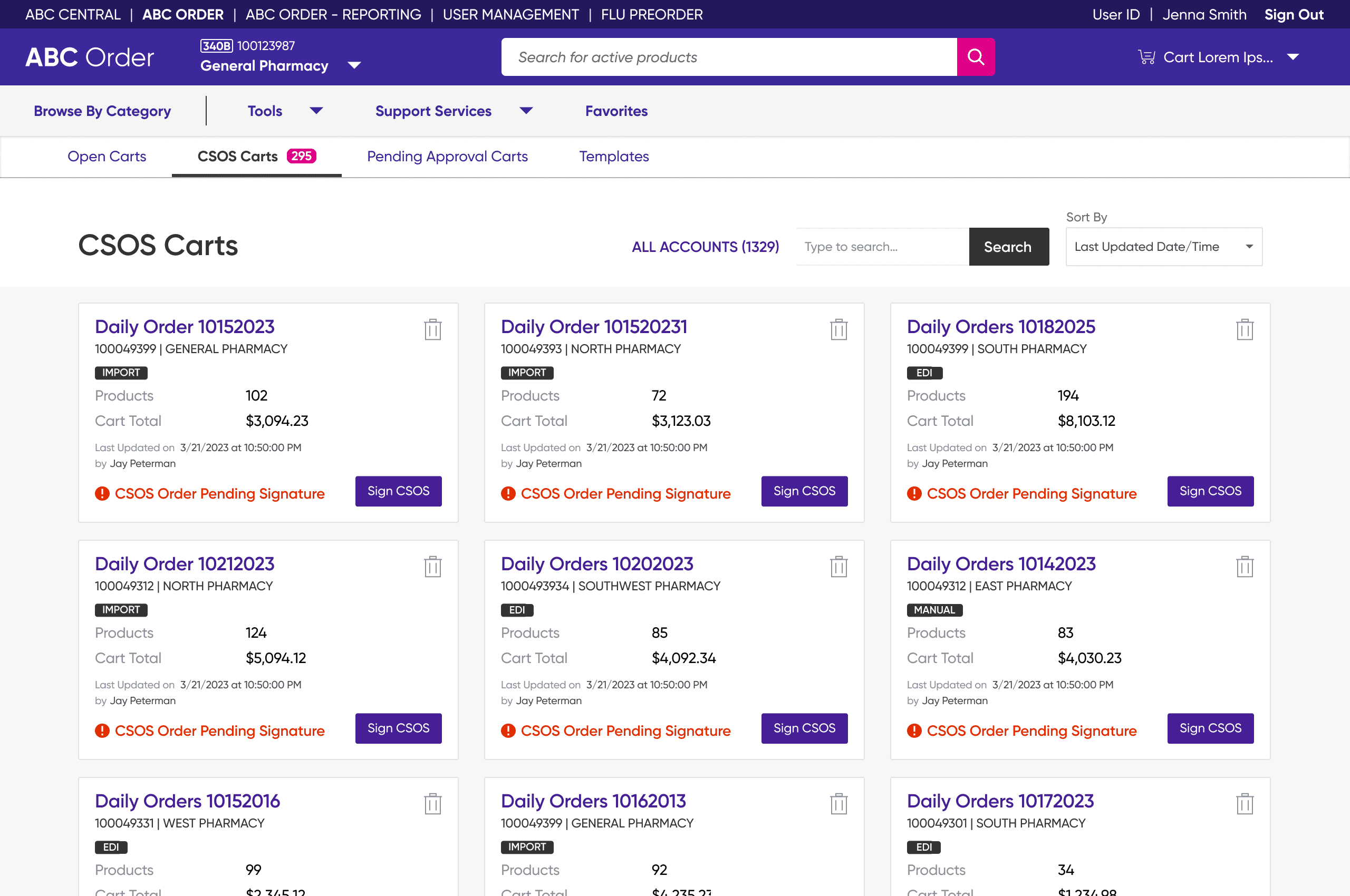
The existing experience handled this with a per-cart signing model: open cart, review, sign, submit, repeat. This was fine for small independent pharmacies, but inefficient for high-volume chain pharmacies, where automated systems drop hundreds of CSOS carts into the queue every day.
My role
I was the embedded designer for CRLTC, one of three main ecommerce storefronts on ABC Order. When the request grew from a CRLTC feature into a cross-platform one, I led the design for all three.
I owned the end-to-end user flows, wireframes, and high-fidelity mockups, and my files became the design source the other two embedded designers worked from, adapting for their respective storefront's branding. I ran the cross-team design reviews with the product, engineering, and regulatory teams throughout the project.
Discovery
Before jumping into Figma, I created end-to-end user flows to help map out the most efficient route to batch signing orders, identify any edge cases or friction points, and align design, business, and development teams first.

Problems
Mapping the user flows helped surface and specify the three problems the design had to solve.
Problem 1
Repetitive
The per-cart model asked for the same five clicks on every order. For chain pharmacies with hundreds of carts that needed signing, this consumed hours of a pharmacist's day.
Problem 2
Vague
Every cart had the same “Pending Signature” status, whether it was ready to sign or blocked by an exception, forcing users to open each cart just to find out if it was ready to sign.
Problem 3
Rigid
There was no way to set carts aside. A single problem meant leaving the signing flow to go fix it, then coming back to start over.
The opportunity
How might we let a pharmacist sign fifty controlled-substance orders as quickly and carefully as they sign one?
Goals
Each problem became something the new signing experience had to solve for. I made five key design decisions to get there, each one tied back to a goal.
Repetitive → Batched
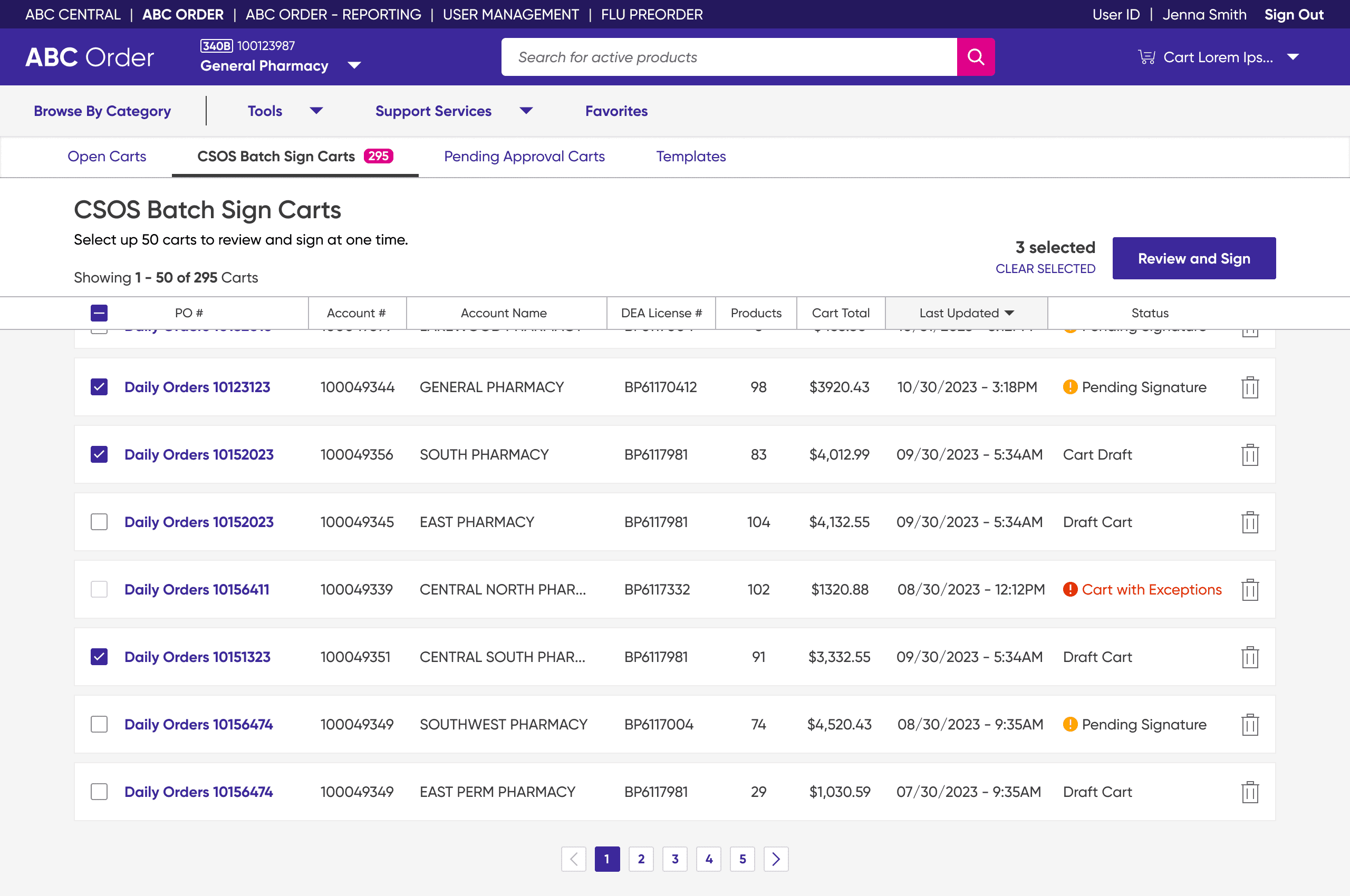
A signer should be able to select and sign up to 50 carts in a single signature event, with select-all working at the header level instead of cart by cart.
Decisions 1 and 3Vague → Specific
Cart status should tell a signer what is signable before they open anything, so a queue of hundreds can be worked through from the list rather than one at a time.
Decisions 2 and 3Rigid → Flexible
A problem with one cart should never cost a signer the rest of the batch, whether they catch it themselves during review or it comes back as a failure upon submit.
Decisions 4 and 5Constraints
There were 2 main constraints I had to keep in mind while working through the designs.
Technical
50 carts per signature event. The Engineering team set the cap, so every screen and flow had to work within that number.
Regulatory
The same legal guarantees as signing one cart. Attestation, non-repudiation, and a full audit trail, all still required for a batch of 50.
Key design decisions
Decision 1 · Batched
List view with header-level multi-select
The old grid had no way to act on more than one cart at a time. I moved to a list view with checkboxes at every row and the header: dense, sortable, and comparable at a glance.
Decision 2 · Specific
Three clear statuses
Previously, every cart shared one “Pending Signature” status, hiding whether it was actually signable. I split it into three: Pending Signature (submitted, not yet signed), Draft Cart (not submitted; signing will submit it), and Cart with Exceptions (blocked from batch signing).
Decision 3 · Batched & Specific
Pagination matched to the 50-cart batch limit
The 50-cart cap was a technical constraint. I turned it into a design opportunity: setting pagination to 50 meant the header checkbox could select an entire eligible page in one click, automatically skipping carts with exceptions.
Decision 4 · Flexible
Remove from Review instead of forced resolution
Even after selection, a pharmacist might notice something worth verifying during review such as an incorrect quantity or product. Without a way to drop just that cart, they would have to cancel the batch and start over. Remove from Review lets them set one cart aside and keep going.
Decision 5 · Flexible
Three confirmation states, not one
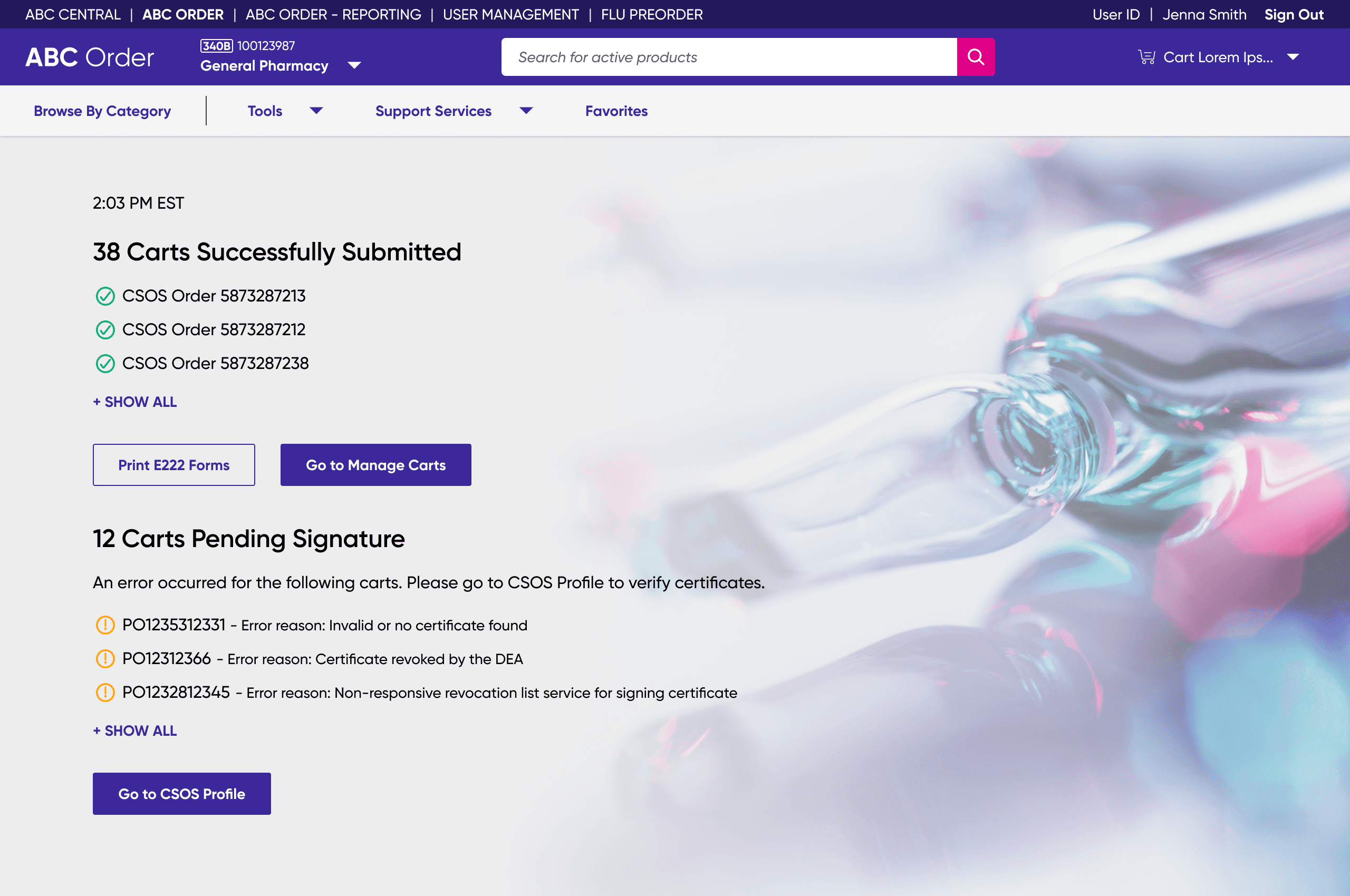
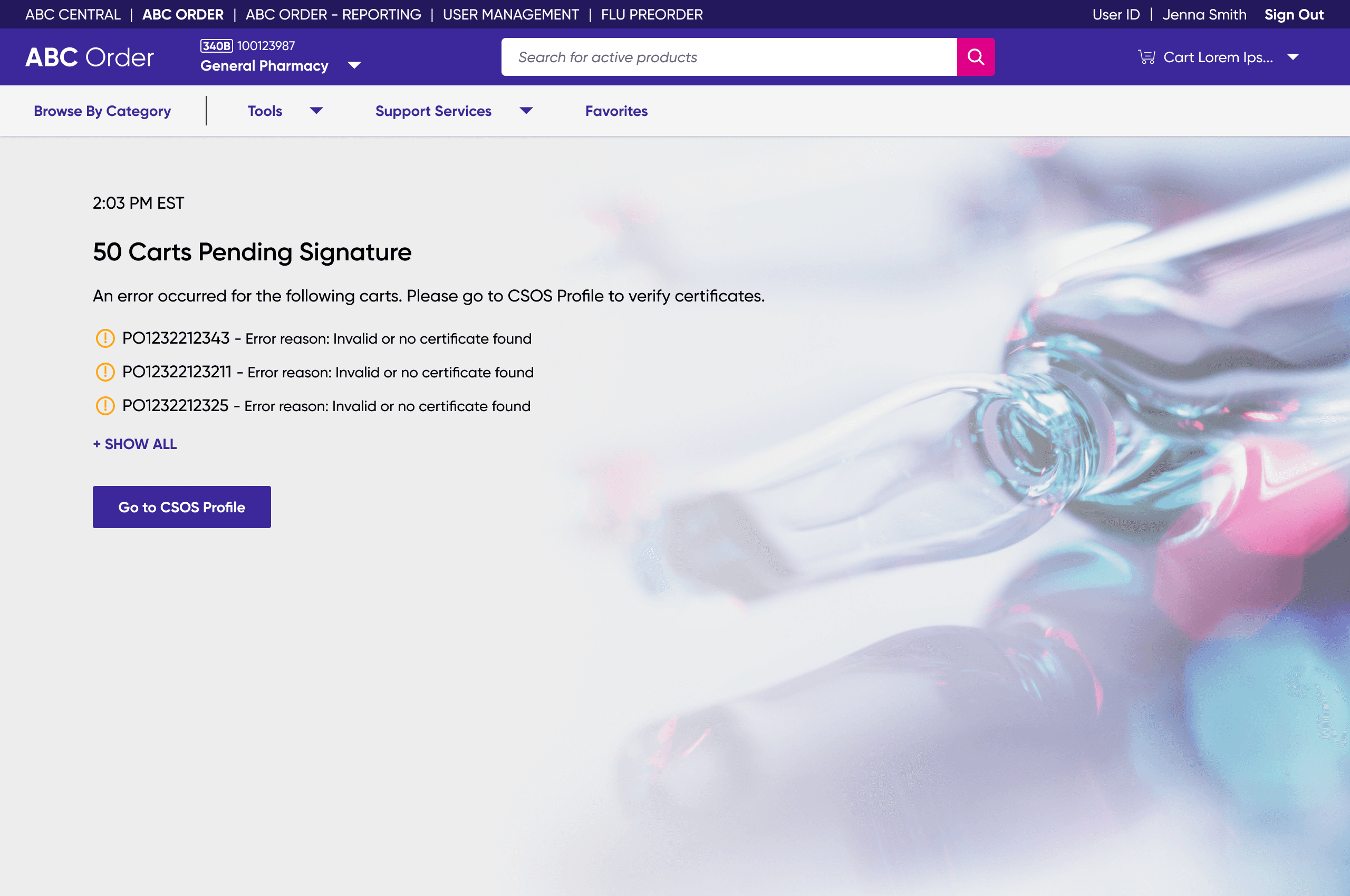
Legisym, the third-party signing provider, can now return submissions as all success, partial success, or all failed. I designed each as its own experience with the right primary action and per-cart error reasons, so users never lose progress on the carts that did go through.

Impact
After release, the feature quickly became part of the daily CSOS workflow for the high-volume chain pharmacy customer it was built for. In 2025, batch signing on ABC Order accounted for:
63,000+
CSOS orders batch-signed
$85M+
Batch CSOS sales processed
98%
Reduction in time spent signing
Work that used to take hours a day on the old single-signing flow now takes under a minute per 50-cart batch.
Reflection
Small features carry big weight. The Remove from Review button looked minor on the design, but the functionality was what made batch signing actually feel like batch signing. Users came to the queue to sign as quickly as possible, and giving them a way to set problem carts aside without blocking the rest of the batch is what made this experience intuitive.
Set baselines before you build. The project moved fast without direct user research or baseline metrics. The Product SME’s customer knowledge was strong but secondhand. Next time, I would push for both — even a few pharmacist interviews would have grounded the design in real signer behavior, and baseline numbers would have sharpened the before-and-after comparison.